
Download Course.im – Free Online Course Creation Tool with AI & Notion-like Editor
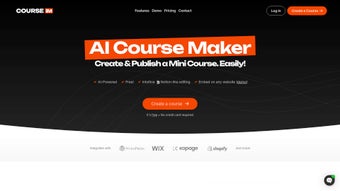
Course.im is a powerful, free web-based platform that empowers educators, entrepreneurs, and content creators to build and share online courses with ease. Designed with simplicity and innovation in mind, Course.im features an intuitive, Notion-inspired editing interface that makes course creation feel natural and efficient. Whether you're launching a personal development workshop, teaching a coding language, or sharing a passion project, Course.im streamlines the entire process—from drafting lessons to publishing and embedding your course on any website.
With built-in AI assistance powered by ChatGPT, you can generate compelling course descriptions, outline modules, and even refine your content with smart suggestions. The platform supports multimedia integration, drag-and-drop organization, and real-time collaboration, making it ideal for both solo creators and small teams. No coding or technical skills are required, allowing anyone to dive in and start teaching within minutes.
With seamless embedding capabilities—just like YouTube—your course can live on your blog, portfolio, or landing page with minimal effort. While Course.im currently lacks advanced analytics and multi-language support, its core strengths in usability, speed, and AI integration make it a standout choice for modern educators seeking a fast, secure, and intuitive course-building experience.
Key Features of Course.im
Course.im stands out in the crowded online course market thanks to its thoughtfully designed features that balance simplicity with powerful functionality. One of its most praised tools is the AI-powered Notion-like editor, which offers a clean, distraction-free workspace where you can structure your course with ease. The drag-and-drop interface lets you rearrange lessons, modules, and sections without any technical hassle, ensuring a smooth workflow from concept to completion. Whether you're adding text, images, videos, or interactive elements, the editor supports a wide range of content formats, enabling rich, engaging learning experiences.
Another major highlight is the integration with ChatGPT. This AI assistant helps you draft compelling course titles, write detailed descriptions, suggest learning objectives, and even refine your content for clarity and impact. For creators who struggle with writer’s block or want to save time on content planning, this feature is a game-changer. You can also use AI to generate quiz questions, summarize key points, or recommend supplementary materials—making content development faster and more consistent.
Course.im also supports direct embedding, allowing you to publish your course on your website, blog, or landing page with just a few clicks. The embed code works like a YouTube video, meaning your audience can access the course without leaving your site. This enhances user retention and strengthens your brand presence.
Additionally, the platform offers real-time collaboration, so team members can co-edit lessons and provide feedback instantly. With automatic version history and cloud-based storage, your work is always safe and accessible from any device. These features collectively make Course.im a versatile and future-ready tool for anyone serious about sharing knowledge online.
How to Install and Use Course.im
One of the biggest advantages of Course.im is its zero-installation requirement. Since it’s a web-based platform, you don’t need to download or install any software—just open your browser and start creating. The first step is to sign up for a free account using your email address or Google account. The registration process is quick and secure, taking less than a minute. Once logged in, you’ll be greeted with a clean dashboard that guides you through your first course creation.
To begin building your course, click on the “Create New Course” button. You’ll be prompted to enter a title, a brief description, and select a category. From there, the Notion-like editor opens, where you can start adding lessons. Use the sidebar to create modules, drag and drop content blocks, and insert multimedia elements like videos, PDFs, or images. Each lesson can include text, bullet points, tables, and even embedded quizzes or interactive exercises.
As you build, leverage the AI assistant by clicking on the “Suggest” button. Type in a prompt like “Generate a course description for a beginner’s Python course” and let ChatGPT do the heavy lifting. You can then edit the output to match your tone and style. When your course is ready, preview it to ensure everything looks and works as expected. Once satisfied, click “Publish” and copy the embed code to place your course on your website or share the direct link with your audience.
For ongoing management, Course.im offers a simple dashboard where you can track views, monitor engagement, and update content. The platform automatically saves your work in real time, so you never lose progress. With its intuitive interface and minimal learning curve, Course.im ensures that even first-time educators can create professional-grade courses without any prior experience.
Compatibility and System Requirements
Course.im is a cloud-based software application, meaning it runs entirely in your web browser and is compatible with a wide range of devices and operating systems. You can access it seamlessly on Windows, Mac, Android, and iOS devices, as long as you have a stable internet connection and a modern browser such as Chrome, Safari, Firefox, or Edge.
There are no specific hardware requirements—your device doesn’t need to be powerful. Whether you're using a desktop, laptop, tablet, or smartphone, Course.im adapts to your screen size and provides an optimal user experience. The platform is fully responsive, so you can start drafting lessons on your iPad during a coffee break and continue editing on your Mac later that day.
For educators and creators who want to integrate their course into an existing website, Course.im offers a simple embed code that works with any content management system (CMS) like WordPress, Wix, Squarespace, or Webflow. This makes it easy to maintain a unified brand experience and keep learners on your site. Additionally, the platform supports multiple file formats, including MP4, MP3, PDF, DOCX, and images, ensuring flexibility in content delivery.
Security is also a top priority. Course.im uses HTTPS encryption and secure authentication protocols to protect your data and course content. Your course is stored in the cloud with regular backups, so you can rest assured that your work is safe and always recoverable. Whether you're building a personal course or managing a team project, Course.im ensures reliable performance across all devices and platforms.
Pros and Cons of Course.im
- Pros:
- Free to use with no hidden fees
- Intuitive Notion-like editor with drag-and-drop functionality
- AI-powered assistance via ChatGPT for content creation
- Seamless embedding on websites like YouTube
- Supports multimedia content (videos, PDFs, images, audio)
- Real-time collaboration and cloud storage
- Zero technical skills required—perfect for beginners
- Fast course creation and publishing process
- Cons:
- Limited advanced analytics and learner progress tracking
- No built-in multi-language support
- AI suggestions may require manual editing for accuracy
- Free plan has limited storage and course visibility
- Lacks built-in payment integration for monetization
Frequently Asked Questions (FAQ)
- Is Course.im free to use?
- Yes, Course.im offers a free plan that allows users to create and publish courses without any cost. The free version includes essential features like AI assistance, multimedia support, and embeddable courses. However, advanced features like analytics and larger storage are available in paid tiers.
- Can I embed my Course.im course on my website?
- Absolutely. Course.im provides a simple embed code that works just like YouTube video embeds. You can paste it into your WordPress, Wix, Squarespace, or any other website to seamlessly display your course on your site.
- Does Course.im support video and audio content?
- Yes, Course.im supports a wide range of multimedia formats, including MP4, MP3, PDFs, DOCX, and images. You can upload your videos and audio files directly into lessons for an engaging learning experience.
- Is there a mobile app for Course.im?
- Currently, Course.im is a web-based platform with no dedicated mobile app. However, it’s fully responsive and works well on mobile browsers, allowing you to manage your course on Android and iOS devices.
- Can I collaborate with others on my course?
- Yes, Course.im supports real-time collaboration. You can invite team members to co-edit your course, provide feedback, and track changes together—all within the same interface.
Final Verdict: Is Course.im Worth It?
Course.im is a standout tool for anyone looking to create and share online educational content without the complexity of traditional course platforms. Its combination of a Notion-like editor, AI-powered assistance, and seamless embedding makes it one of the fastest and most user-friendly solutions available today. While it lacks advanced analytics and multi-language support, the core experience is smooth, secure, and highly intuitive—perfect for educators, coaches, freelancers, and hobbyists.
For those who value speed, simplicity, and creativity in course creation, Course.im delivers exceptional value. Whether you're teaching a skill, sharing a passion, or building a personal brand, this platform empowers you to publish professional-quality content in minutes. With its free tier and continuous updates, Course.im is a smart choice for early-stage creators and professionals alike.
Ready to start teaching? Download Course.im today and turn your knowledge into a powerful online course—no coding, no hassle, just results.



.png)



